Every project in one place
What's decided, what's due and what you're waiting on, kept with the job. Not scattered across old chats, emails and your head.
How I run my projects →ChatGPT is handy for one email or one question. But every chat starts from scratch. It doesn't know your jobs, your clients or what you agreed last month.
I set up a system that does. Each project has one place for what's decided, due and waiting. You ask it things, typing or talking, and it answers with where it found the answer. It reminds you what's due and what's still outstanding, and it drafts things for you to check.
Useful. But next week you start again and paste it all back in.
The answer comes with the email it came from.
The AI underneath is much the same. What changes is what it works from. Instead of a blank chat, it has your projects, your notes and the way your office does things.
What's decided, what's due and what you're waiting on, kept with the job. Not scattered across old chats, emails and your head.
How I run my projects →When you ask what a client said, it tells you and points to the email or note it found it in. So you can check it in seconds.
The practice manual behind it →A site meeting tomorrow, a reply that hasn't come, drawings due on Wednesday. You hear about it before you have to remember it.
Replies, fee proposals and council forms are prepared from what's already on file. You read them, change what you like, and send them yourself.
Fee proposals in practice →You keep working the way you do now. The difference is that nothing has to be explained twice.
Talk through the site visit on your phone, even from the car. The note is filed with the right project.
Find the latest decision, the email or note behind it, and anything that's still open.
A reply or a form is prepared from what's on file. A person checks it before anything goes out.
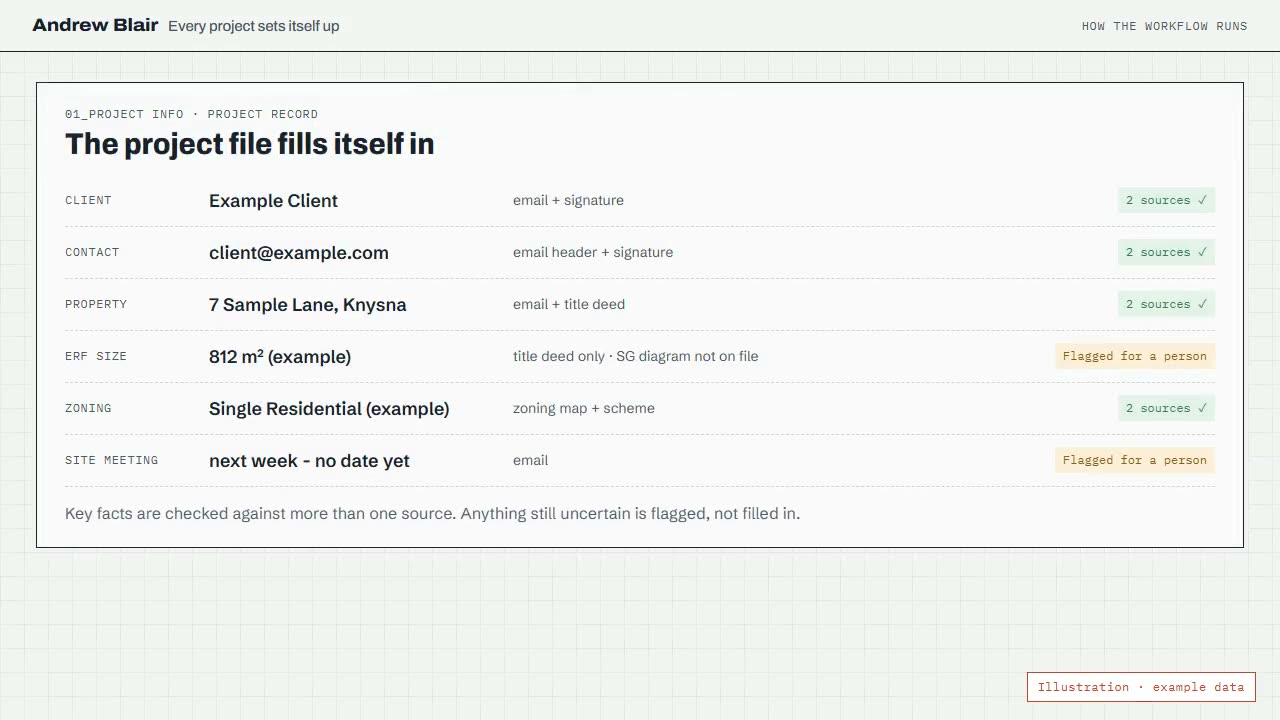
Council forms in practice →Project details usually sit in separate emails, plans, site notes and people's heads. When a new job comes in, my system sets up the project and fills in the client and property details, with where each one came from.
Anything it isn't sure about is marked for me to check, not guessed.
No new software to learn, and nothing to build yourself. We start with a short chat about how your office works. I suggest one thing worth setting up first, build it around the way you already work, and show you and your team how to use it.
If this still feels unfamiliar, start with the plain-English page. If you'd rather see the real thing, look at what I've built.